
OWASP Mobile Top 10:2024
A guide to the ten current OWASP Mobile Top 10:2024 categories for Android, iOS, and the services they depend on.
Edition 2024. Risk names follow the official OWASP publication.
M1
Improper Credential Usage
Improper Credential Usage means a mobile app embeds, stores, transmits, or uses passwords, API keys, tokens, or sessions unsafely. Hardcoded secrets or passwords in ordinary device storage can be extracted through reverse engineering or a lost device and reused against the backend.
| What can go wrong | Secrets, tokens, API keys, or passwords are embedded, reused, exposed, or handled without an appropriate lifecycle. |
|---|---|
| Business effect | A recovered application package or leaked token can provide ongoing access to a backend or protected function. |
| First control to verify | Keep long-lived secrets out of the client. |
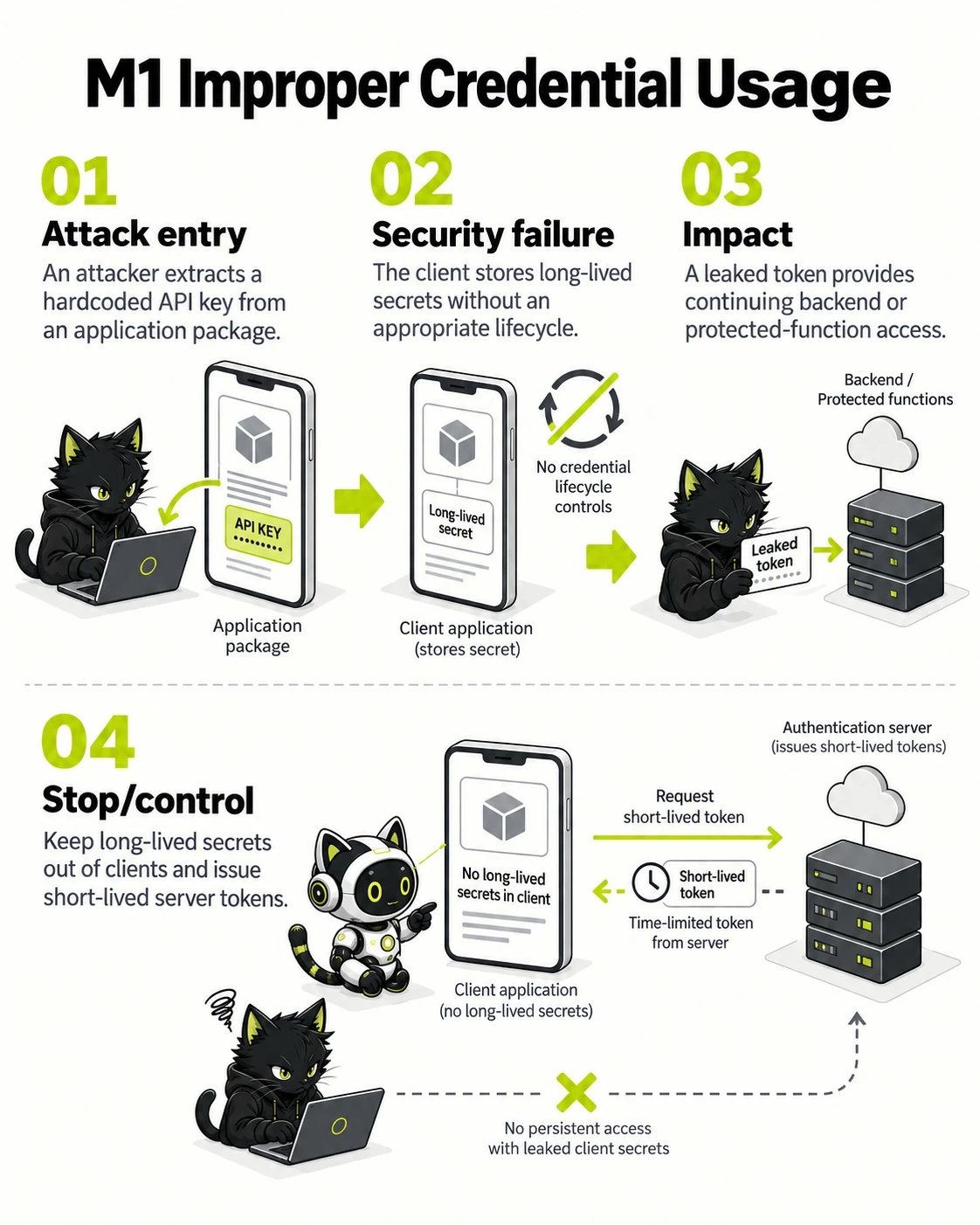
A distributed client is not a trustworthy secret store.
- Attack entry — An attacker extracts a hardcoded API key from an application package.
- Security failure — The client stores long-lived secrets without an appropriate lifecycle.
- Impact — A leaked token provides continuing backend or protected-function access.
- Stop/control — Keep long-lived secrets out of clients and issue short-lived server tokens.
The diagram contrasts the unsafe route with the control that interrupts it. Select the image to inspect it at full size.
Why it matters
A recovered application package or leaked token can provide ongoing access to a backend or protected function.
Risk-reduction focus
- Keep long-lived secrets out of the client.
- Use scoped, revocable credentials and rotate them.
- Protect credential entry and transmission paths.
Android example in Kotlin
Vulnerable example
import android.content.Intent
import android.net.Uri
import androidx.appcompat.app.AppCompatActivity

class RedirectActivity : AppCompatActivity() {
    fun openRedirect(intent: Intent) {
        val rawTarget = intent.data?.getQueryParameter("redirect") ?: return
        startActivity(Intent(Intent.ACTION_VIEW, Uri.parse(rawTarget)))
    }
}
Fixed example
import android.content.Intent
import android.net.Uri
import androidx.browser.customtabs.CustomTabsIntent
import androidx.appcompat.app.AppCompatActivity

class RedirectActivity : AppCompatActivity() {
    private val allowedHosts = setOf("app.example.com")

    fun openRedirect(intent: Intent) {
        val rawTarget = intent.data?.getQueryParameter("redirect") ?: return
        val target = Uri.parse(rawTarget)
        if (target.scheme != "https" || target.host !in allowedHosts) return
        CustomTabsIntent.Builder().build().launchUrl(this, target)
    }
}
iOS example in Swift
Vulnerable example
import UIKit

final class RedirectViewController: UIViewController {
    func openRedirect(rawTarget: String) {
        guard let target = URL(string: rawTarget) else { return }
        UIApplication.shared.open(target)
    }
}
Fixed example
import SafariServices
import UIKit

final class RedirectViewController: UIViewController {
    private let allowedHosts: Set<String> = ["app.example.com"]

    func openRedirect(rawTarget: String) {
        guard let target = URL(string: rawTarget),
              target.scheme == "https",
              let host = target.host,
              allowedHosts.contains(host) else { return }

        let browser = SFSafariViewController(url: target)
        present(browser, animated: true)
    }
}
M2
Inadequate Supply Chain Security
Inadequate Supply Chain Security means the app, SDKs, dependencies, build system, or package signing lack adequate provenance and integrity control. A changed third-party SDK, compromised pipeline, or leaked signing key can make an installed app do work the team never intended.
| What can go wrong | Mobile SDKs, build plugins, signing systems, and distribution dependencies are not sufficiently governed. |
|---|---|
| Business effect | A compromised SDK or release pipeline can introduce tracking, data exposure, or altered application behavior. |
| First control to verify | Inventory third-party SDKs and their data flows. |
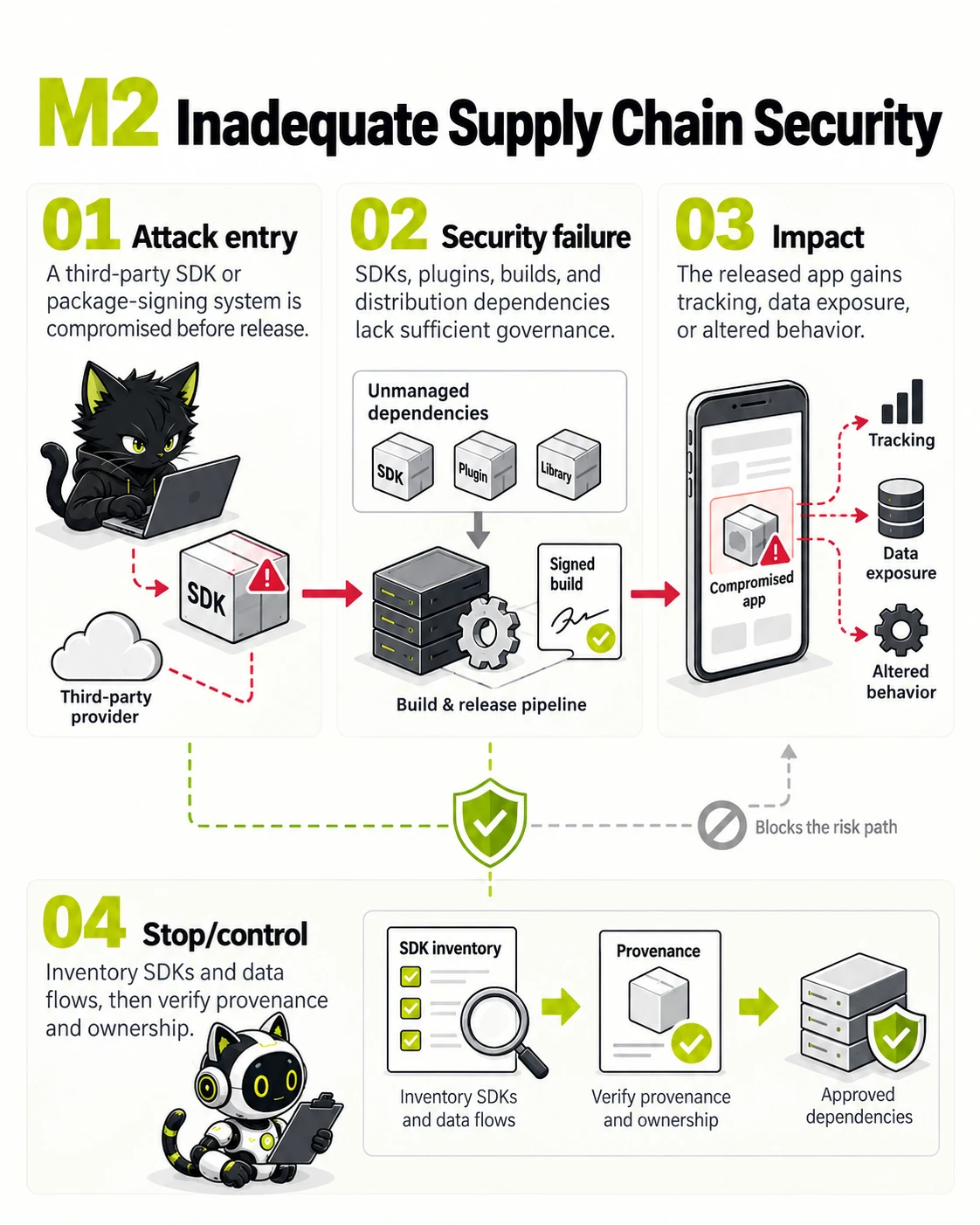
Mobile application security depends on SDKs, builds, and signing keys.
- Attack entry — A third-party SDK or package-signing system is compromised before release.
- Security failure — SDKs, plugins, builds, and distribution dependencies lack sufficient governance.
- Impact — The released app gains tracking, data exposure, or altered behavior.
- Stop/control — Inventory SDKs and data flows, then verify provenance and ownership.
The diagram contrasts the unsafe route with the control that interrupts it. Select the image to inspect it at full size.
Why it matters
A compromised SDK or release pipeline can introduce tracking, data exposure, or altered application behavior.
Risk-reduction focus
- Inventory third-party SDKs and their data flows.
- Restrict and audit signing and release access.
- Verify package origin, integrity, and update notices.
Android example in Kotlin
Vulnerable example
import android.content.Intent
import android.net.Uri
import androidx.appcompat.app.AppCompatActivity

class RedirectActivity : AppCompatActivity() {
    fun openRedirect(intent: Intent) {
        val rawTarget = intent.data?.getQueryParameter("redirect") ?: return
        startActivity(Intent(Intent.ACTION_VIEW, Uri.parse(rawTarget)))
    }
}
Fixed example
import android.content.Intent
import android.net.Uri
import androidx.browser.customtabs.CustomTabsIntent
import androidx.appcompat.app.AppCompatActivity

class RedirectActivity : AppCompatActivity() {
    private val allowedHosts = setOf("app.example.com")

    fun openRedirect(intent: Intent) {
        val rawTarget = intent.data?.getQueryParameter("redirect") ?: return
        val target = Uri.parse(rawTarget)
        if (target.scheme != "https" || target.host !in allowedHosts) return
        CustomTabsIntent.Builder().build().launchUrl(this, target)
    }
}
iOS example in Swift
Vulnerable example
import UIKit

final class RedirectViewController: UIViewController {
    func openRedirect(rawTarget: String) {
        guard let target = URL(string: rawTarget) else { return }
        UIApplication.shared.open(target)
    }
}
Fixed example
import SafariServices
import UIKit

final class RedirectViewController: UIViewController {
    private let allowedHosts: Set<String> = ["app.example.com"]

    func openRedirect(rawTarget: String) {
        guard let target = URL(string: rawTarget),
              target.scheme == "https",
              let host = target.host,
              allowedHosts.contains(host) else { return }

        let browser = SFSafariViewController(url: target)
        present(browser, animated: true)
    }
}
M3
Insecure Authentication and Authorization
Insecure Authentication and Authorization means the mobile app or backend misidentifies a user or grants actions incorrectly. Incomplete token checks, client-supplied roles, or sessions surviving logout can enable account takeover, cross-user data access, or restricted functions.
| What can go wrong | The app or its backend accepts weak identity proof, session handling, or permission decisions. |
|---|---|
| Business effect | A device user or remote actor can access another account, protected feature, or data set. |
| First control to verify | Authorize requests on the backend, not only in the app. |
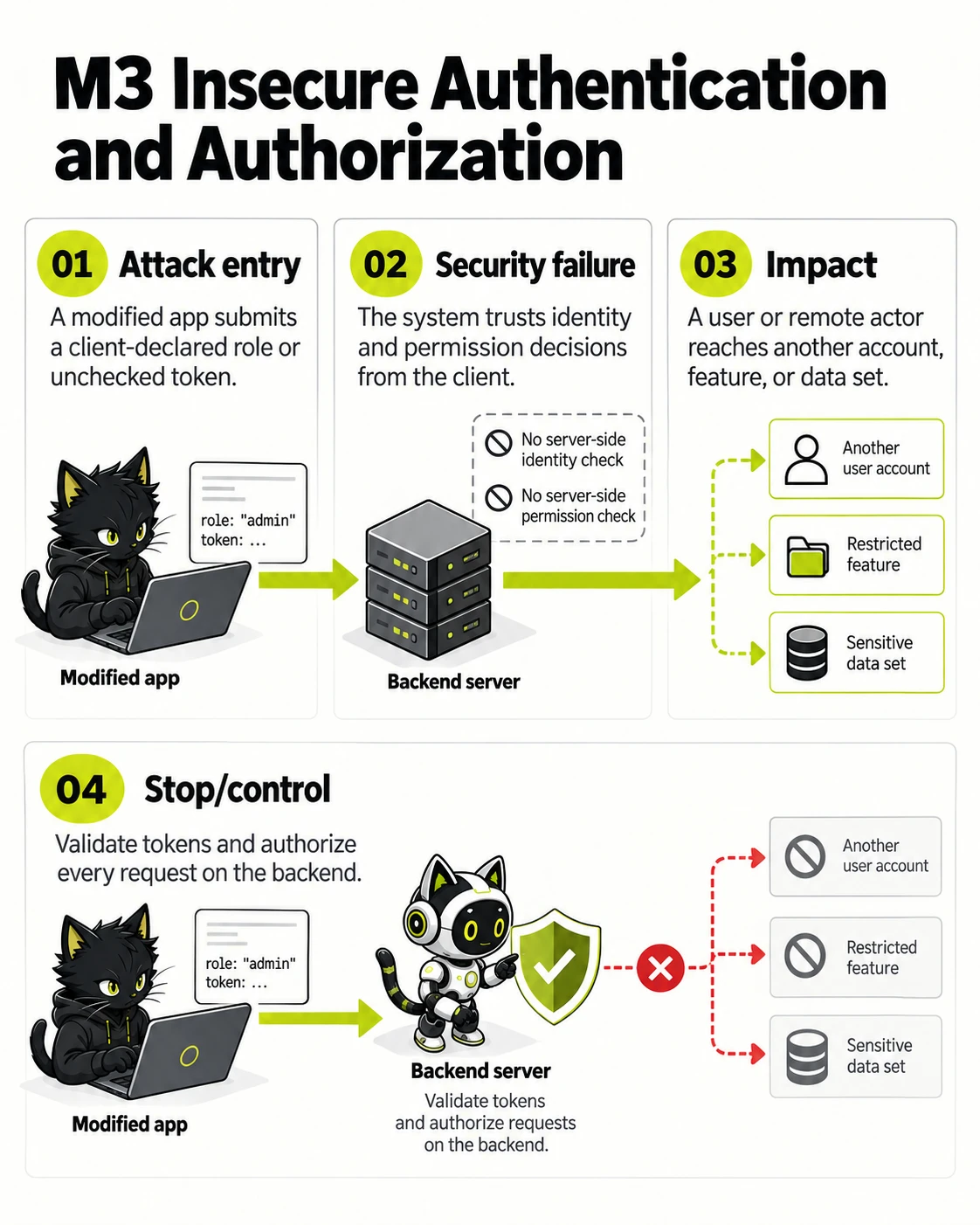
Client-side controls cannot replace backend authorization.
- Attack entry — A modified app submits a client-declared role or unchecked token.
- Security failure — The system trusts identity and permission decisions from the client.
- Impact — A user or remote actor reaches another account, feature, or data set.
- Stop/control — Validate tokens and authorize every request on the backend.
The diagram contrasts the unsafe route with the control that interrupts it. Select the image to inspect it at full size.
Why it matters
A device user or remote actor can access another account, protected feature, or data set.
Risk-reduction focus
- Authorize requests on the backend, not only in the app.
- Use secure sessions and risk-appropriate MFA.
- Test deep links, app components, and backend object access.
Android example in Kotlin
Vulnerable example
import android.content.Intent
import android.net.Uri
import androidx.appcompat.app.AppCompatActivity

class RedirectActivity : AppCompatActivity() {
    fun openRedirect(intent: Intent) {
        val rawTarget = intent.data?.getQueryParameter("redirect") ?: return
        startActivity(Intent(Intent.ACTION_VIEW, Uri.parse(rawTarget)))
    }
}
Fixed example
import android.content.Intent
import android.net.Uri
import androidx.browser.customtabs.CustomTabsIntent
import androidx.appcompat.app.AppCompatActivity

class RedirectActivity : AppCompatActivity() {
    private val allowedHosts = setOf("app.example.com")

    fun openRedirect(intent: Intent) {
        val rawTarget = intent.data?.getQueryParameter("redirect") ?: return
        val target = Uri.parse(rawTarget)
        if (target.scheme != "https" || target.host !in allowedHosts) return
        CustomTabsIntent.Builder().build().launchUrl(this, target)
    }
}
iOS example in Swift
Vulnerable example
import UIKit

final class RedirectViewController: UIViewController {
    func openRedirect(rawTarget: String) {
        guard let target = URL(string: rawTarget) else { return }
        UIApplication.shared.open(target)
    }
}
Fixed example
import SafariServices
import UIKit

final class RedirectViewController: UIViewController {
    private let allowedHosts: Set<String> = ["app.example.com"]

    func openRedirect(rawTarget: String) {
        guard let target = URL(string: rawTarget),
              target.scheme == "https",
              let host = target.host,
              allowedHosts.contains(host) else { return }

        let browser = SFSafariViewController(url: target)
        present(browser, animated: true)
    }
}
M4
Insufficient Input/Output Validation
Insufficient Input/Output Validation means the app trusts deep links, QR values, intents, files, server responses, or rendered output without checking format, source, and bounds. Tampered data can open an unsafe target, alter a workflow, or send data to the wrong destination.
| What can go wrong | Data crossing application, device, backend, browser, or third-party boundaries is trusted without sufficient checks. |
|---|---|
| Business effect | Malicious content can alter an app flow, be rendered unsafely, or drive an unsafe backend operation. |
| First control to verify | Validate all external data at each trust boundary. |
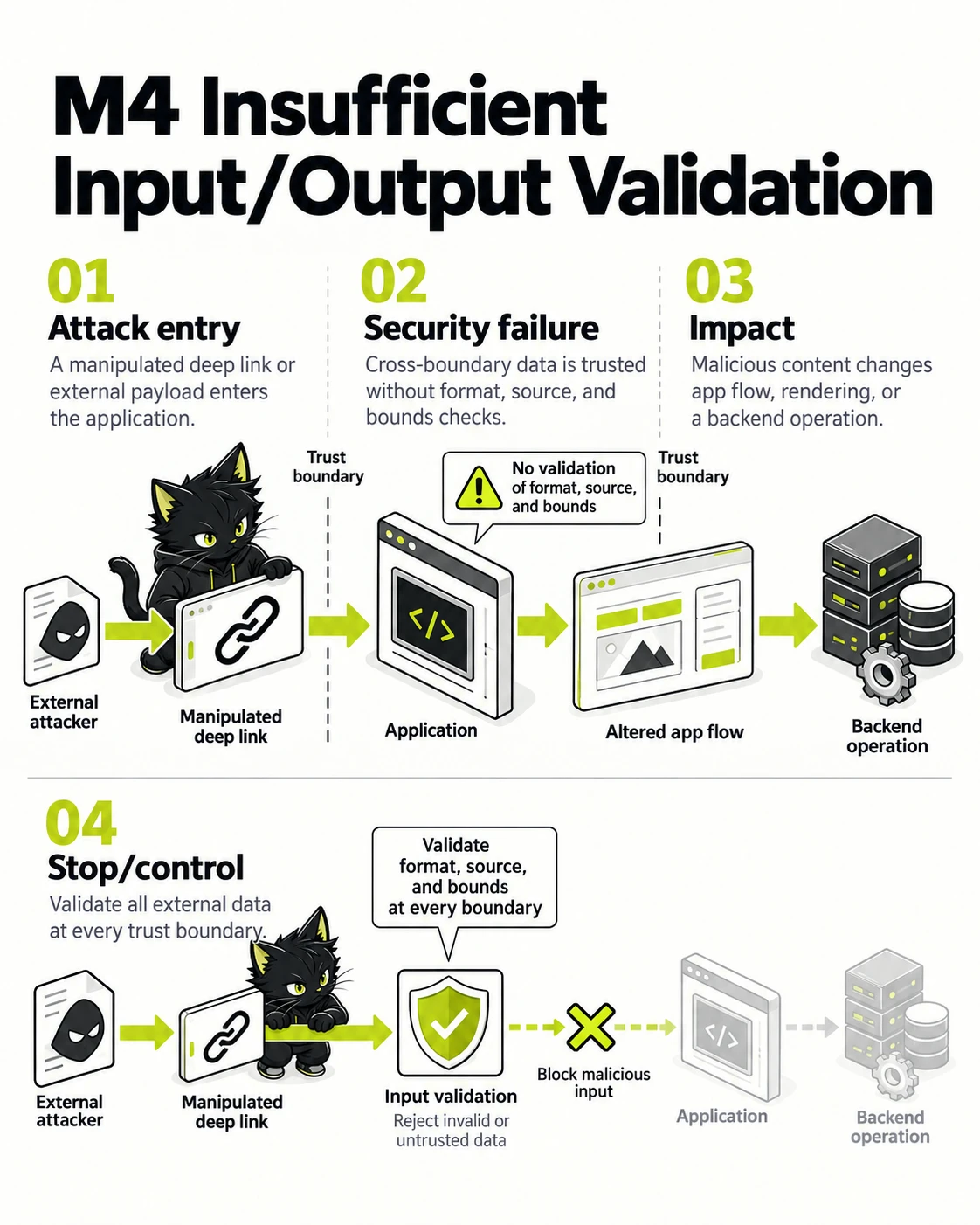
Data moving between device, app, backend, and services needs contextual validation.
- Attack entry — A manipulated deep link or external payload enters the application.
- Security failure — Cross-boundary data is trusted without format, source, and bounds checks.
- Impact — Malicious content changes app flow, rendering, or a backend operation.
- Stop/control — Validate all external data at every trust boundary.
The diagram contrasts the unsafe route with the control that interrupts it. Select the image to inspect it at full size.
Why it matters
Malicious content can alter an app flow, be rendered unsafely, or drive an unsafe backend operation.
Risk-reduction focus
- Validate all external data at each trust boundary.
- Encode output for its rendering context.
- Use typed contracts and reject unexpected fields.
Android example in Kotlin
Vulnerable example
import android.content.Intent
import android.net.Uri
import androidx.appcompat.app.AppCompatActivity

class RedirectActivity : AppCompatActivity() {
    fun openRedirect(intent: Intent) {
        val rawTarget = intent.data?.getQueryParameter("redirect") ?: return
        startActivity(Intent(Intent.ACTION_VIEW, Uri.parse(rawTarget)))
    }
}
Fixed example
import android.content.Intent
import android.net.Uri
import androidx.browser.customtabs.CustomTabsIntent
import androidx.appcompat.app.AppCompatActivity

class RedirectActivity : AppCompatActivity() {
    private val allowedHosts = setOf("app.example.com")

    fun openRedirect(intent: Intent) {
        val rawTarget = intent.data?.getQueryParameter("redirect") ?: return
        val target = Uri.parse(rawTarget)
        if (target.scheme != "https" || target.host !in allowedHosts) return
        CustomTabsIntent.Builder().build().launchUrl(this, target)
    }
}
iOS example in Swift
Vulnerable example
import UIKit

final class RedirectViewController: UIViewController {
    func openRedirect(rawTarget: String) {
        guard let target = URL(string: rawTarget) else { return }
        UIApplication.shared.open(target)
    }
}
Fixed example
import SafariServices
import UIKit

final class RedirectViewController: UIViewController {
    private let allowedHosts: Set<String> = ["app.example.com"]

    func openRedirect(rawTarget: String) {
        guard let target = URL(string: rawTarget),
              target.scheme == "https",
              let host = target.host,
              allowedHosts.contains(host) else { return }

        let browser = SFSafariViewController(url: target)
        present(browser, animated: true)
    }
}
M5
Insecure Communication
Insecure Communication means app-to-service data is not sufficiently protected against interception or modification. Trusting unverified certificates, using HTTP, incomplete TLS validation, or sending secrets through another unsafe channel can let a nearby network attacker read or alter traffic.
| What can go wrong | Network traffic, certificate handling, or channel selection does not adequately protect data in transit. |
|---|---|
| Business effect | A hostile or compromised network can observe, alter, or redirect sensitive exchanges. |
| First control to verify | Require modern TLS for sensitive connections. |
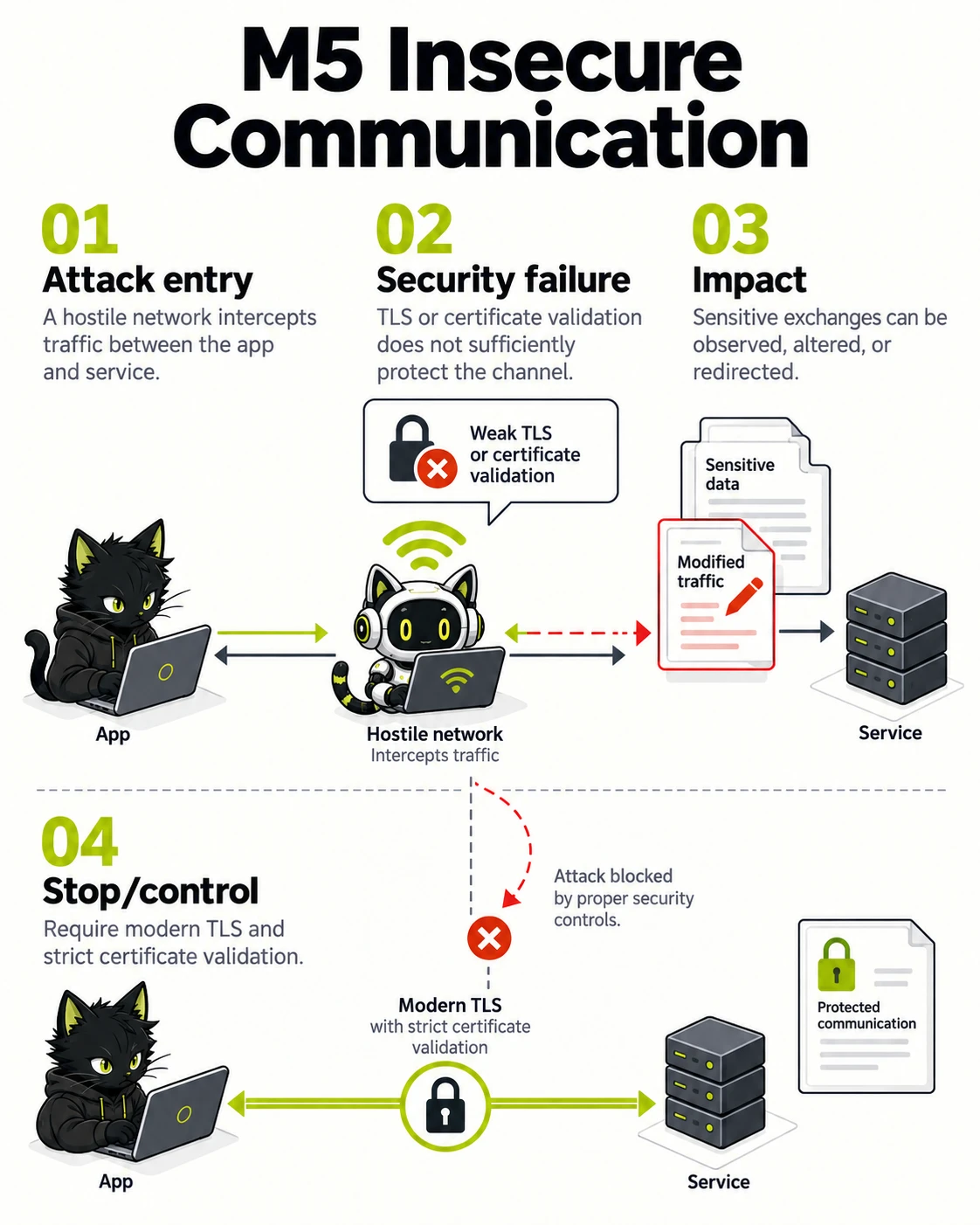
Transport protection must resist both observation and modification.
- Attack entry — A hostile network intercepts traffic between the app and service.
- Security failure — TLS or certificate validation does not sufficiently protect the channel.
- Impact — Sensitive exchanges can be observed, altered, or redirected.
- Stop/control — Require modern TLS and strict certificate validation.
The diagram contrasts the unsafe route with the control that interrupts it. Select the image to inspect it at full size.
Why it matters
A hostile or compromised network can observe, alter, or redirect sensitive exchanges.
Risk-reduction focus
- Require modern TLS for sensitive connections.
- Validate certificates and avoid trust-all behavior.
- Limit sensitive data in requests and diagnostics.
Android example in Kotlin
Vulnerable example
import android.content.Intent
import android.net.Uri
import androidx.appcompat.app.AppCompatActivity

class RedirectActivity : AppCompatActivity() {
    fun openRedirect(intent: Intent) {
        val rawTarget = intent.data?.getQueryParameter("redirect") ?: return
        startActivity(Intent(Intent.ACTION_VIEW, Uri.parse(rawTarget)))
    }
}
Fixed example
import android.content.Intent
import android.net.Uri
import androidx.browser.customtabs.CustomTabsIntent
import androidx.appcompat.app.AppCompatActivity

class RedirectActivity : AppCompatActivity() {
    private val allowedHosts = setOf("app.example.com")

    fun openRedirect(intent: Intent) {
        val rawTarget = intent.data?.getQueryParameter("redirect") ?: return
        val target = Uri.parse(rawTarget)
        if (target.scheme != "https" || target.host !in allowedHosts) return
        CustomTabsIntent.Builder().build().launchUrl(this, target)
    }
}
iOS example in Swift
Vulnerable example
import UIKit

final class RedirectViewController: UIViewController {
    func openRedirect(rawTarget: String) {
        guard let target = URL(string: rawTarget) else { return }
        UIApplication.shared.open(target)
    }
}
Fixed example
import SafariServices
import UIKit

final class RedirectViewController: UIViewController {
    private let allowedHosts: Set<String> = ["app.example.com"]

    func openRedirect(rawTarget: String) {
        guard let target = URL(string: rawTarget),
              target.scheme == "https",
              let host = target.host,
              allowedHosts.contains(host) else { return }

        let browser = SFSafariViewController(url: target)
        present(browser, animated: true)
    }
}
M6
Inadequate Privacy Controls
Inadequate Privacy Controls occur when an app collects, uses, discloses, or retains personal data beyond a clear purpose or without understandable control. Unneeded permissions, identifiable analytics, or missing consent management create risks for users, trust, and privacy obligations.
| What can go wrong | The app collects, shares, retains, or exposes personal data beyond the disclosed and necessary purpose. |
|---|---|
| Business effect | Users can lose control of personal information through telemetry, permissions, analytics, or third-party sharing. |
| First control to verify | Map personal-data collection and recipients. |
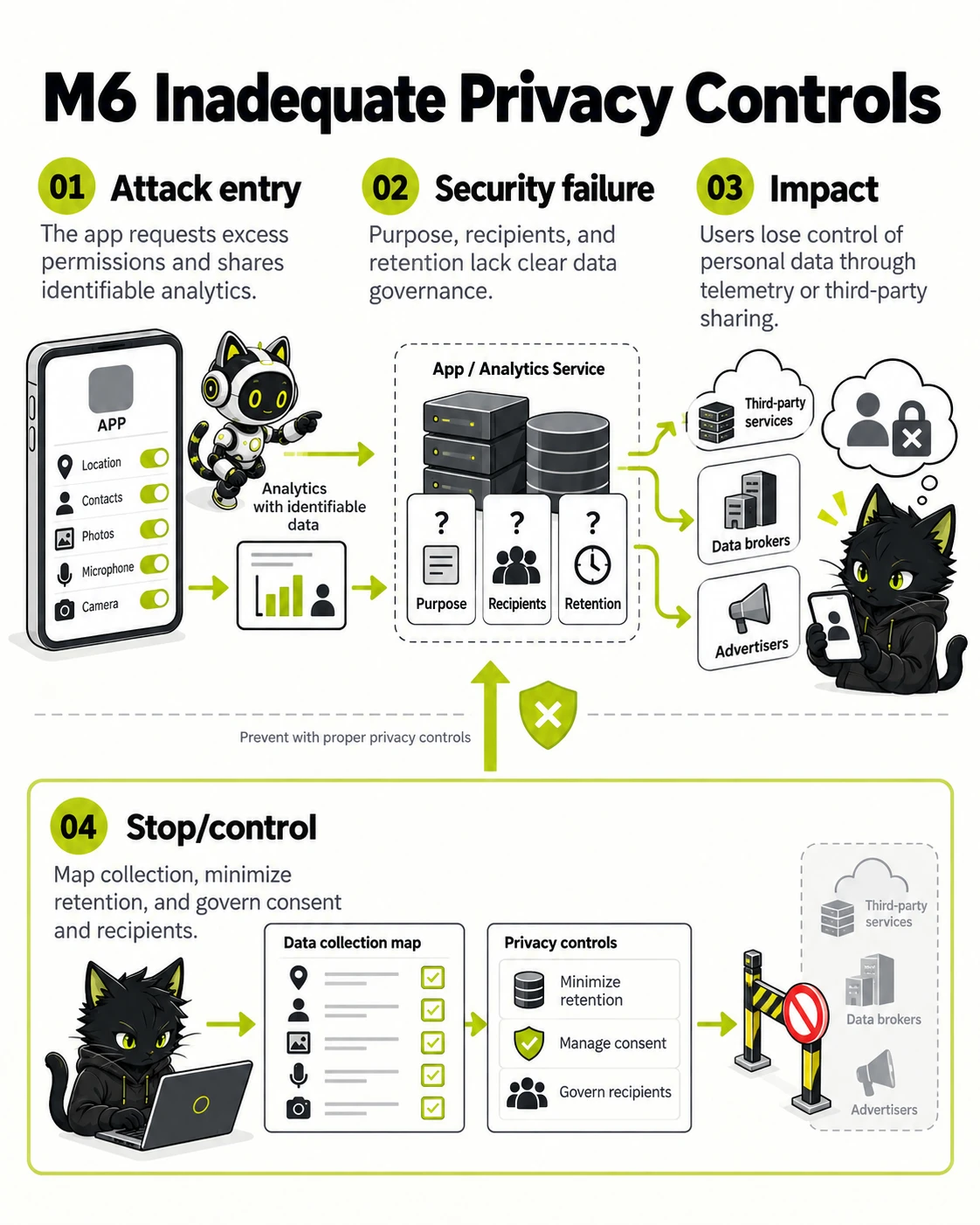
Personal-data collection must be necessary, transparent, and controllable.
- Attack entry — The app requests excess permissions and shares identifiable analytics.
- Security failure — Purpose, recipients, and retention lack clear data governance.
- Impact — Users lose control of personal data through telemetry or third-party sharing.
- Stop/control — Map collection, minimize retention, and govern consent and recipients.
The diagram contrasts the unsafe route with the control that interrupts it. Select the image to inspect it at full size.
Why it matters
Users can lose control of personal information through telemetry, permissions, analytics, or third-party sharing.
Risk-reduction focus
- Map personal-data collection and recipients.
- Request only necessary permissions at the right time.
- Apply retention, consent, and deletion controls.
Android example in Kotlin
Vulnerable example
import android.content.Intent
import android.net.Uri
import androidx.appcompat.app.AppCompatActivity

class RedirectActivity : AppCompatActivity() {
    fun openRedirect(intent: Intent) {
        val rawTarget = intent.data?.getQueryParameter("redirect") ?: return
        startActivity(Intent(Intent.ACTION_VIEW, Uri.parse(rawTarget)))
    }
}
Fixed example
import android.content.Intent
import android.net.Uri
import androidx.browser.customtabs.CustomTabsIntent
import androidx.appcompat.app.AppCompatActivity

class RedirectActivity : AppCompatActivity() {
    private val allowedHosts = setOf("app.example.com")

    fun openRedirect(intent: Intent) {
        val rawTarget = intent.data?.getQueryParameter("redirect") ?: return
        val target = Uri.parse(rawTarget)
        if (target.scheme != "https" || target.host !in allowedHosts) return
        CustomTabsIntent.Builder().build().launchUrl(this, target)
    }
}
iOS example in Swift
Vulnerable example
import UIKit

final class RedirectViewController: UIViewController {
    func openRedirect(rawTarget: String) {
        guard let target = URL(string: rawTarget) else { return }
        UIApplication.shared.open(target)
    }
}
Fixed example
import SafariServices
import UIKit

final class RedirectViewController: UIViewController {
    private let allowedHosts: Set<String> = ["app.example.com"]

    func openRedirect(rawTarget: String) {
        guard let target = URL(string: rawTarget),
              target.scheme == "https",
              let host = target.host,
              allowedHosts.contains(host) else { return }

        let browser = SFSafariViewController(url: target)
        present(browser, animated: true)
    }
}
M7
Insufficient Binary Protections
Insufficient Binary Protections mean an app binary is easy to inspect, modify, or repackage so client-side safeguards can be bypassed. Missing tamper detection or device-integrity checks are examples. These controls do not replace server-side enforcement, but they raise attack cost and create detection signals.
| What can go wrong | The distributed app does not sufficiently resist unauthorized modification, repackaging, or analysis for its threat model. |
|---|---|
| Business effect | A modified client can remove controls, expose implementation details, or misrepresent a trusted application to users. |
| First control to verify | Keep trust decisions and secrets server-side. |
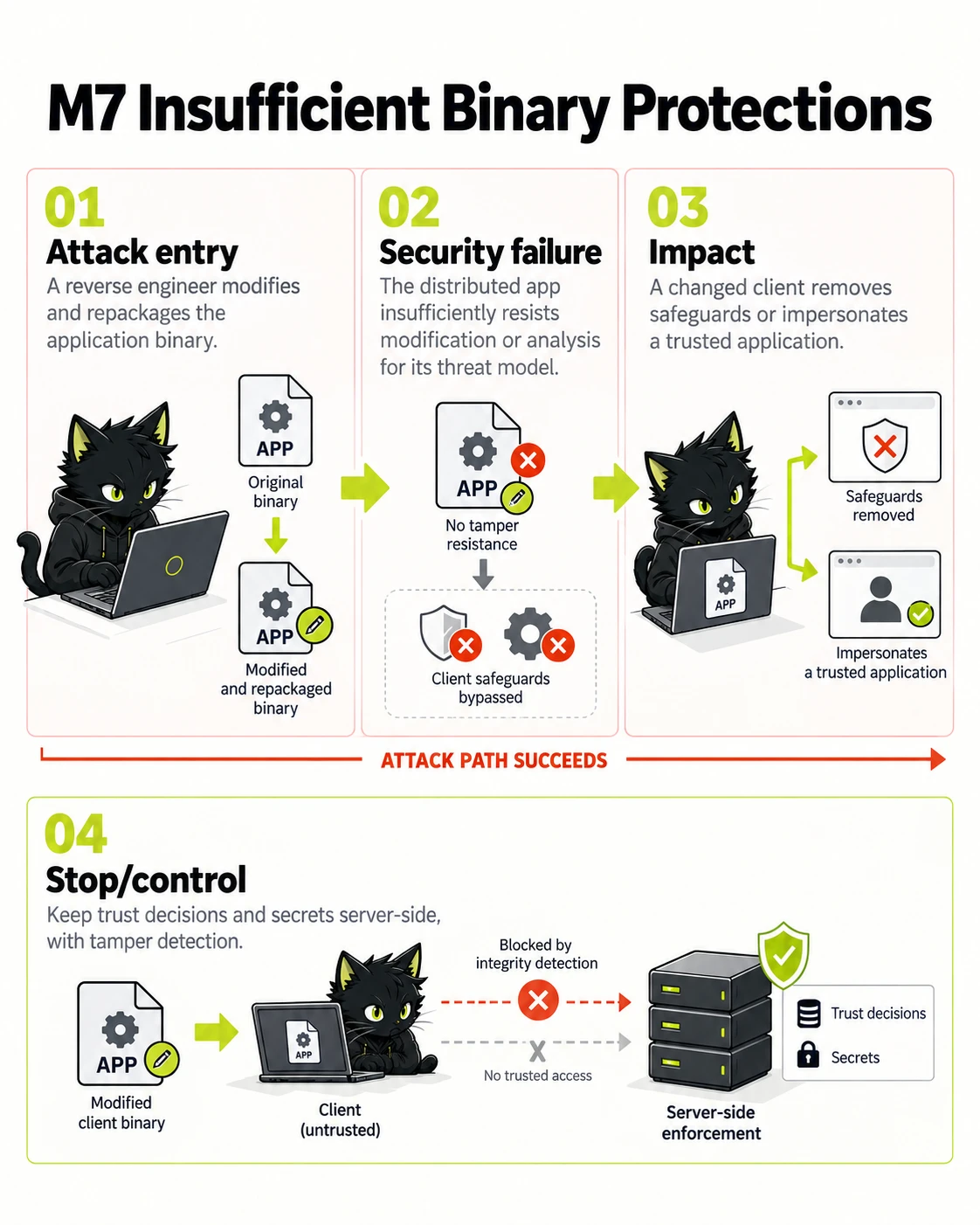
Binary defenses raise attack cost; server-side enforcement remains essential.
- Attack entry — A reverse engineer modifies and repackages the application binary.
- Security failure — The distributed app insufficiently resists modification or analysis for its threat model.
- Impact — A changed client removes safeguards or impersonates a trusted application.
- Stop/control — Keep trust decisions and secrets server-side, with tamper detection.
The diagram contrasts the unsafe route with the control that interrupts it. Select the image to inspect it at full size.
Why it matters
A modified client can remove controls, expose implementation details, or misrepresent a trusted application to users.
Risk-reduction focus
- Keep trust decisions and secrets server-side.
- Use platform signing and integrity signals where appropriate.
- Detect tampering proportionately and plan safe responses.
Android example in Kotlin
Vulnerable example
import android.content.Intent
import android.net.Uri
import androidx.appcompat.app.AppCompatActivity

class RedirectActivity : AppCompatActivity() {
    fun openRedirect(intent: Intent) {
        val rawTarget = intent.data?.getQueryParameter("redirect") ?: return
        startActivity(Intent(Intent.ACTION_VIEW, Uri.parse(rawTarget)))
    }
}
Fixed example
import android.content.Intent
import android.net.Uri
import androidx.browser.customtabs.CustomTabsIntent
import androidx.appcompat.app.AppCompatActivity

class RedirectActivity : AppCompatActivity() {
    private val allowedHosts = setOf("app.example.com")

    fun openRedirect(intent: Intent) {
        val rawTarget = intent.data?.getQueryParameter("redirect") ?: return
        val target = Uri.parse(rawTarget)
        if (target.scheme != "https" || target.host !in allowedHosts) return
        CustomTabsIntent.Builder().build().launchUrl(this, target)
    }
}
iOS example in Swift
Vulnerable example
import UIKit

final class RedirectViewController: UIViewController {
    func openRedirect(rawTarget: String) {
        guard let target = URL(string: rawTarget) else { return }
        UIApplication.shared.open(target)
    }
}
Fixed example
import SafariServices
import UIKit

final class RedirectViewController: UIViewController {
    private let allowedHosts: Set<String> = ["app.example.com"]

    func openRedirect(rawTarget: String) {
        guard let target = URL(string: rawTarget),
              target.scheme == "https",
              let host = target.host,
              allowedHosts.contains(host) else { return }

        let browser = SFSafariViewController(url: target)
        present(browser, animated: true)
    }
}
M8
Security Misconfiguration
Mobile Security Misconfiguration is unnecessary exposure through capabilities, components, debug settings, permissions, or network policy. An exported activity, extractable backup, or release debug endpoint can let another app invoke functionality or access data outside the intended UI.
| What can go wrong | Build variants, platform settings, exported components, or backend configuration expose unintended behavior. |
|---|---|
| Business effect | Debug features, exported components, permissive backups, or weak transport settings can be reachable in a release. |
| First control to verify | Review release manifests and platform settings. |
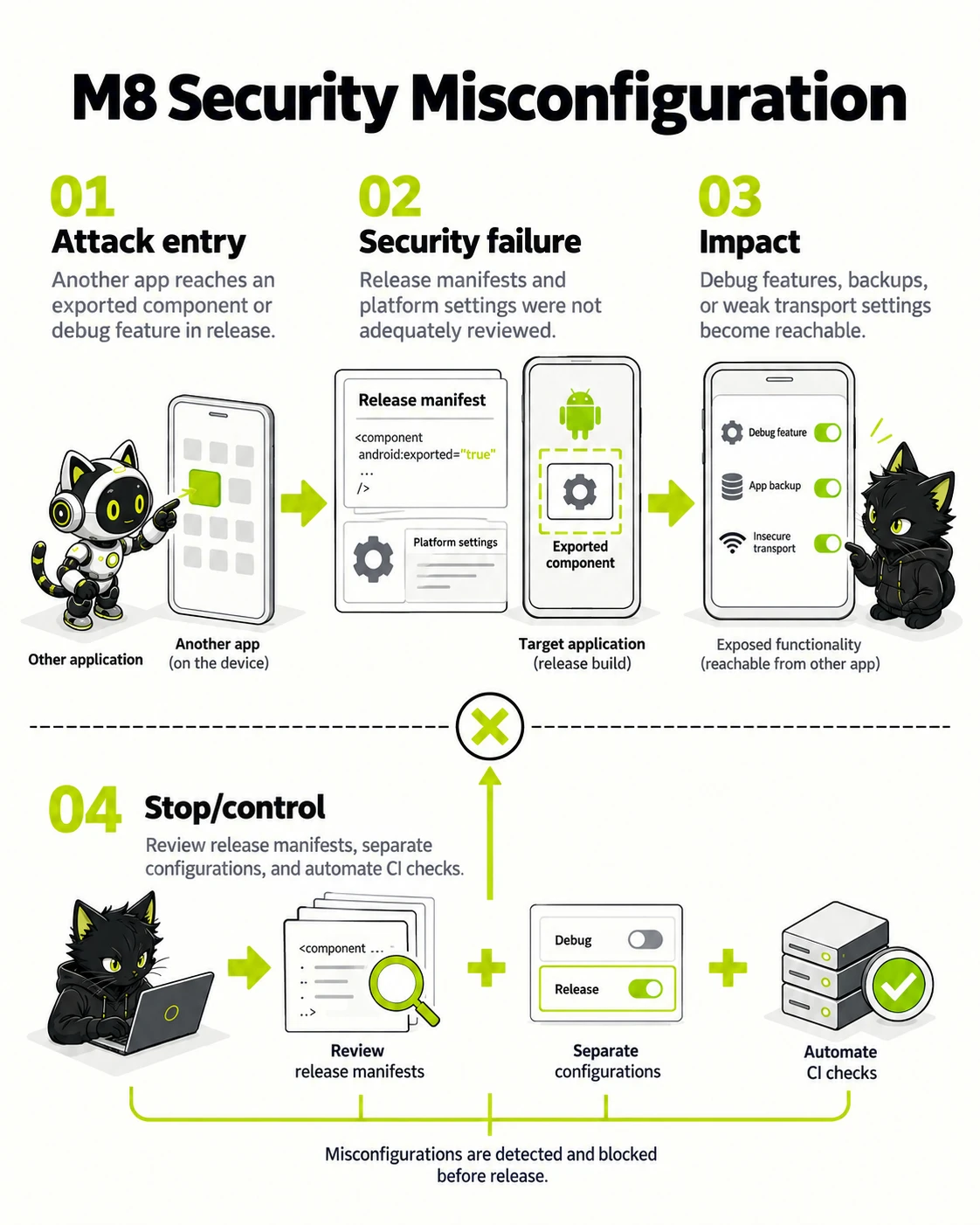
Build and platform configuration form part of the mobile attack surface.
- Attack entry — Another app reaches an exported component or debug feature in release.
- Security failure — Release manifests and platform settings were not adequately reviewed.
- Impact — Debug features, backups, or weak transport settings become reachable.
- Stop/control — Review release manifests, separate configurations, and automate CI checks.
The diagram contrasts the unsafe route with the control that interrupts it. Select the image to inspect it at full size.
Why it matters
Debug features, exported components, permissive backups, or weak transport settings can be reachable in a release.
Risk-reduction focus
- Review release manifests and platform settings.
- Separate debug and production configuration.
- Automate configuration checks in CI.
Android example in Kotlin
Vulnerable example
import android.content.Intent
import android.net.Uri
import androidx.appcompat.app.AppCompatActivity

class RedirectActivity : AppCompatActivity() {
    fun openRedirect(intent: Intent) {
        val rawTarget = intent.data?.getQueryParameter("redirect") ?: return
        startActivity(Intent(Intent.ACTION_VIEW, Uri.parse(rawTarget)))
    }
}
Fixed example
import android.content.Intent
import android.net.Uri
import androidx.browser.customtabs.CustomTabsIntent
import androidx.appcompat.app.AppCompatActivity

class RedirectActivity : AppCompatActivity() {
    private val allowedHosts = setOf("app.example.com")

    fun openRedirect(intent: Intent) {
        val rawTarget = intent.data?.getQueryParameter("redirect") ?: return
        val target = Uri.parse(rawTarget)
        if (target.scheme != "https" || target.host !in allowedHosts) return
        CustomTabsIntent.Builder().build().launchUrl(this, target)
    }
}
iOS example in Swift
Vulnerable example
import UIKit

final class RedirectViewController: UIViewController {
    func openRedirect(rawTarget: String) {
        guard let target = URL(string: rawTarget) else { return }
        UIApplication.shared.open(target)
    }
}
Fixed example
import SafariServices
import UIKit

final class RedirectViewController: UIViewController {
    private let allowedHosts: Set<String> = ["app.example.com"]

    func openRedirect(rawTarget: String) {
        guard let target = URL(string: rawTarget),
              target.scheme == "https",
              let host = target.host,
              allowedHosts.contains(host) else { return }

        let browser = SFSafariViewController(url: target)
        present(browser, animated: true)
    }
}
M9
Insecure Data Storage
Insecure Data Storage means sensitive data is saved on the device without suitable protection, such as in shared preferences, caches, logs, screenshots, clipboard, or backups. It can leak through rooted or jailbroken devices, backup extraction, malware, or temporary physical access.
| What can go wrong | Sensitive data is stored locally or cached where another application, backup, device user, or forensic process can access it. |
|---|---|
| Business effect | A lost, rooted, shared, or backed-up device can reveal account, business, or personal data. |
| First control to verify | Minimize local sensitive data and cache duration. |
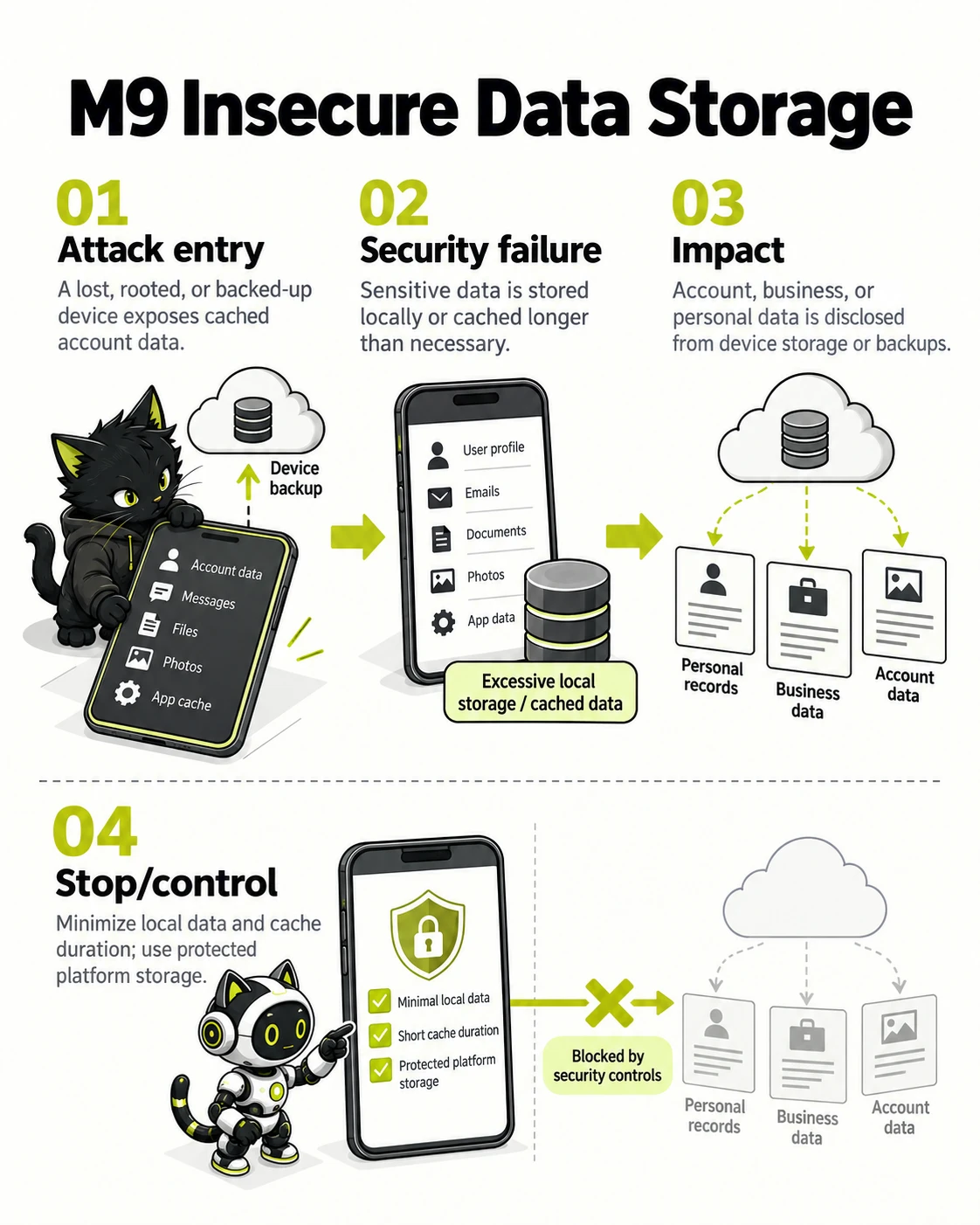
Sensitive data never stored on a device cannot leak through that device or backup.
- Attack entry — A lost, rooted, or backed-up device exposes cached account data.
- Security failure — Sensitive data is stored locally or cached longer than necessary.
- Impact — Account, business, or personal data is disclosed from device storage or backups.
- Stop/control — Minimize local data and cache duration; use protected platform storage.
The diagram contrasts the unsafe route with the control that interrupts it. Select the image to inspect it at full size.
Why it matters
A lost, rooted, shared, or backed-up device can reveal account, business, or personal data.
Risk-reduction focus
- Minimize local sensitive data and cache duration.
- Use platform-protected storage for necessary secrets.
- Review logs, screenshots, backups, and shared storage.
Android example in Kotlin
Vulnerable example
import android.content.Intent
import android.net.Uri
import androidx.appcompat.app.AppCompatActivity

class RedirectActivity : AppCompatActivity() {
    fun openRedirect(intent: Intent) {
        val rawTarget = intent.data?.getQueryParameter("redirect") ?: return
        startActivity(Intent(Intent.ACTION_VIEW, Uri.parse(rawTarget)))
    }
}
Fixed example
import android.content.Intent
import android.net.Uri
import androidx.browser.customtabs.CustomTabsIntent
import androidx.appcompat.app.AppCompatActivity

class RedirectActivity : AppCompatActivity() {
    private val allowedHosts = setOf("app.example.com")

    fun openRedirect(intent: Intent) {
        val rawTarget = intent.data?.getQueryParameter("redirect") ?: return
        val target = Uri.parse(rawTarget)
        if (target.scheme != "https" || target.host !in allowedHosts) return
        CustomTabsIntent.Builder().build().launchUrl(this, target)
    }
}
iOS example in Swift
Vulnerable example
import UIKit

final class RedirectViewController: UIViewController {
    func openRedirect(rawTarget: String) {
        guard let target = URL(string: rawTarget) else { return }
        UIApplication.shared.open(target)
    }
}
Fixed example
import SafariServices
import UIKit

final class RedirectViewController: UIViewController {
    private let allowedHosts: Set<String> = ["app.example.com"]

    func openRedirect(rawTarget: String) {
        guard let target = URL(string: rawTarget),
              target.scheme == "https",
              let host = target.host,
              allowedHosts.contains(host) else { return }

        let browser = SFSafariViewController(url: target)
        present(browser, animated: true)
    }
}
M10
Insufficient Cryptography
Insufficient Cryptography means an app selects or applies algorithms, keys, random values, or libraries incorrectly even when encryption exists. Guessable keys, unsuitable modes, or readable key storage can let an attacker who obtains data or keys decrypt or forge it.
| What can go wrong | Cryptographic algorithms, modes, random values, keys, or implementations do not protect mobile data as intended. |
|---|---|
| Business effect | Data protected by weak or incorrectly implemented cryptography can be recovered or altered. |
| First control to verify | Use platform and vetted cryptographic APIs. |
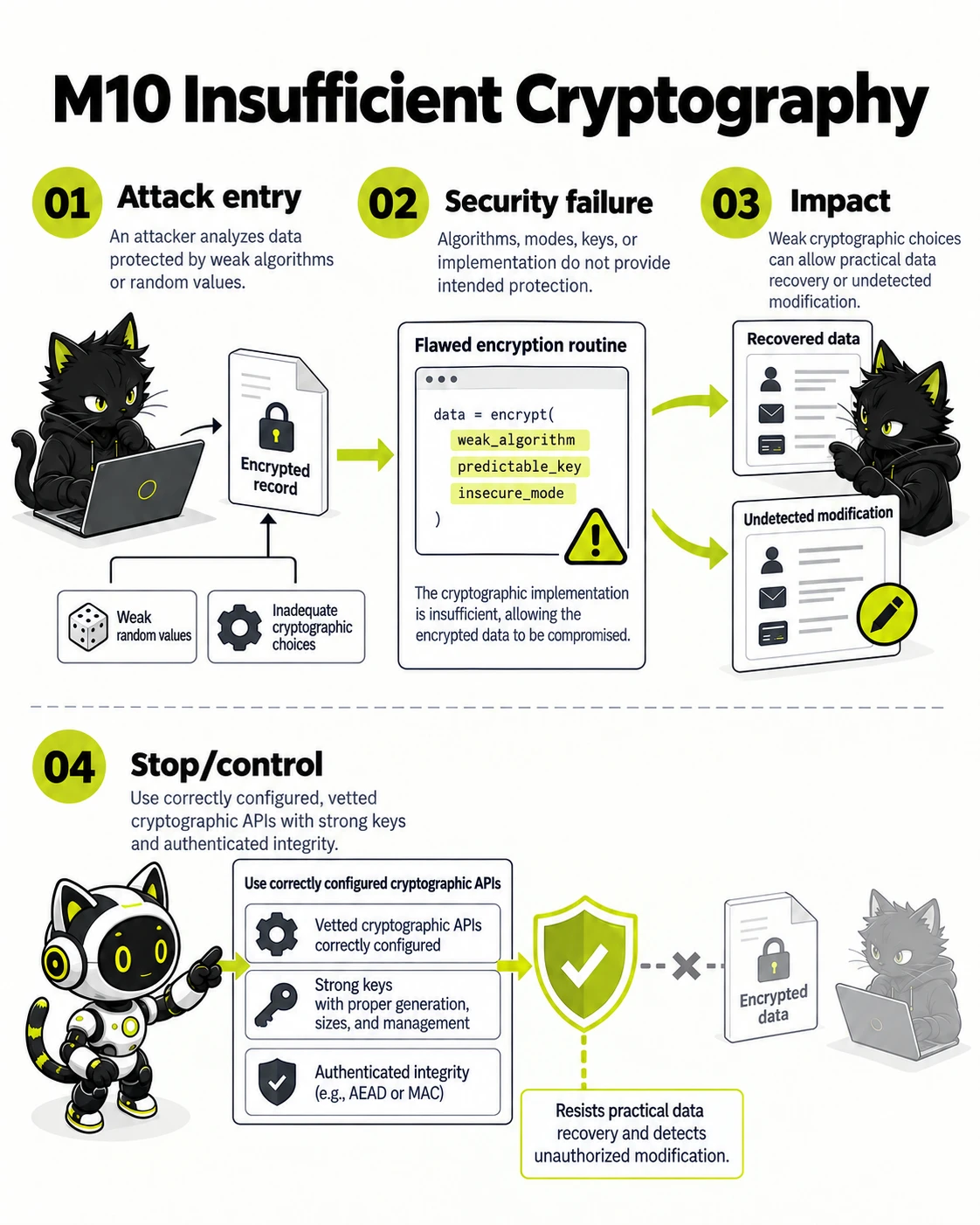
Cryptography depends on correct algorithms, keys, randomness, and implementation.
- Attack entry — An attacker analyzes data protected by weak algorithms or random values.
- Security failure — Algorithms, modes, keys, or implementation do not provide intended protection.
- Impact — Encrypted data can be recovered or altered.
- Stop/control — Use platform cryptographic APIs and vetted cryptographic libraries.
The diagram contrasts the unsafe route with the control that interrupts it. Select the image to inspect it at full size.
Why it matters
Data protected by weak or incorrectly implemented cryptography can be recovered or altered.
Risk-reduction focus
- Use platform and vetted cryptographic APIs.
- Generate and store keys with platform protections.
- Avoid custom cryptography and obsolete algorithms.
Android example in Kotlin
Vulnerable example
import android.content.Intent
import android.net.Uri
import androidx.appcompat.app.AppCompatActivity

class RedirectActivity : AppCompatActivity() {
    fun openRedirect(intent: Intent) {
        val rawTarget = intent.data?.getQueryParameter("redirect") ?: return
        startActivity(Intent(Intent.ACTION_VIEW, Uri.parse(rawTarget)))
    }
}
Fixed example
import android.content.Intent
import android.net.Uri
import androidx.browser.customtabs.CustomTabsIntent
import androidx.appcompat.app.AppCompatActivity

class RedirectActivity : AppCompatActivity() {
    private val allowedHosts = setOf("app.example.com")

    fun openRedirect(intent: Intent) {
        val rawTarget = intent.data?.getQueryParameter("redirect") ?: return
        val target = Uri.parse(rawTarget)
        if (target.scheme != "https" || target.host !in allowedHosts) return
        CustomTabsIntent.Builder().build().launchUrl(this, target)
    }
}
iOS example in Swift
Vulnerable example
import UIKit

final class RedirectViewController: UIViewController {
    func openRedirect(rawTarget: String) {
        guard let target = URL(string: rawTarget) else { return }
        UIApplication.shared.open(target)
    }
}
Fixed example
import SafariServices
import UIKit

final class RedirectViewController: UIViewController {
    private let allowedHosts: Set<String> = ["app.example.com"]

    func openRedirect(rawTarget: String) {
        guard let target = URL(string: rawTarget),
              target.scheme == "https",
              let host = target.host,
              allowedHosts.contains(host) else { return }

        let browser = SFSafariViewController(url: target)
        present(browser, animated: true)
    }
}
OWASP MASVS v2.1.0 verification controls and the OWASP MASTG v2.0.0 testing guide
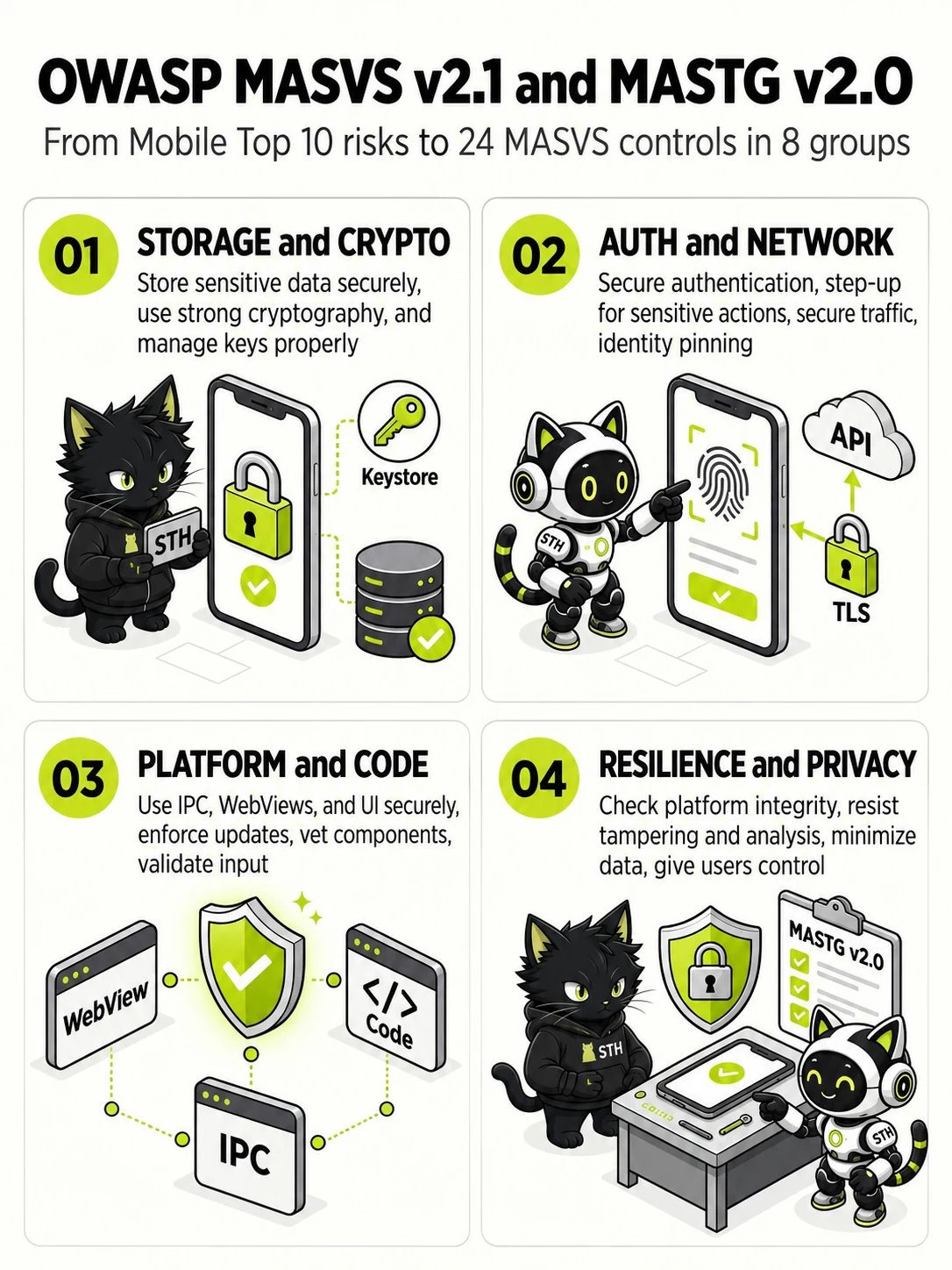
From Mobile Top 10 risks to 24 MASVS controls in 8 groups
- STORAGE and CRYPTO
- Store sensitive data securely, use strong cryptography, and manage keys properly
- AUTH and NETWORK
- Secure authentication, step-up for sensitive actions, secure traffic, identity pinning
- PLATFORM and CODE
- Use IPC, WebViews, and UI securely, enforce updates, vet components, validate input
- RESILIENCE and PRIVACY
- Check platform integrity, resist tampering and analysis, minimize data, give users control
STH mobile penetration testing maps OWASP Mobile Top 10 (2024) findings to the OWASP Mobile Application Security Verification Standard (MASVS) v2.1.0 and the OWASP Mobile Application Security Testing Guide (MASTG) v2.0.0. MASVS defines 24 controls in 8 groups.
- MASVS-STORAGE has 2 controls. The app securely stores sensitive data (MASVS-STORAGE-1) and prevents leakage of sensitive data (MASVS-STORAGE-2).
- MASVS-CRYPTO has 2 controls. The app employs current strong cryptography according to industry best practices (MASVS-CRYPTO-1) and performs key management according to industry best practices (MASVS-CRYPTO-2).
- MASVS-AUTH has 3 controls. The app uses secure authentication and authorization protocols (MASVS-AUTH-1), performs local authentication securely according to platform best practices (MASVS-AUTH-2), and secures sensitive operations with additional authentication (MASVS-AUTH-3).
- MASVS-NETWORK has 2 controls. The app secures all network traffic according to current best practices (MASVS-NETWORK-1) and performs identity pinning for all remote endpoints under the developer's control (MASVS-NETWORK-2).
- MASVS-PLATFORM has 3 controls. The app uses IPC mechanisms (MASVS-PLATFORM-1), WebViews (MASVS-PLATFORM-2), and the user interface (MASVS-PLATFORM-3) securely.
- MASVS-CODE has 4 controls. The app requires an up-to-date platform version (MASVS-CODE-1), has a mechanism for enforcing app updates (MASVS-CODE-2), only uses software components without known vulnerabilities (MASVS-CODE-3), and validates and sanitizes all untrusted inputs (MASVS-CODE-4).
- MASVS-RESILIENCE has 4 controls. The app validates the integrity of the platform (MASVS-RESILIENCE-1) and implements anti-tampering (MASVS-RESILIENCE-2), anti-static analysis (MASVS-RESILIENCE-3), and anti-dynamic analysis (MASVS-RESILIENCE-4) mechanisms.
- MASVS-PRIVACY has 4 controls. The app minimizes access to sensitive data and resources (MASVS-PRIVACY-1), prevents identification of the user (MASVS-PRIVACY-2), is transparent about data collection and usage (MASVS-PRIVACY-3), and offers user control over their data (MASVS-PRIVACY-4).
Compliance Readiness Self-Assessment
Select items your organization has completed to evaluate your readiness score.